Facebook simply explained: app, login, users & the Business Manager
Facebook at a glance – Facebook(Meta) is the largest and best-known social media network in the world. Facebook was founded in February 2004 in Cambridge, Massachusetts in the United States by Mark Zuckerberg and his team. With its users, personal profiles, interests, groups and relationships, Facebook as a platform offers companies a wealth of data, which in turn can be used for targeted Facebook Ads (advertising on Facebook). Login, registration and more – that’s Facebook.
Facebook: Founders, users & parent company
To date, the site has collected around 2.5 billion monthly active users. The platform has been owned by CEO Mark Zuckerberg since it was founded in 2004. Facebook is part of the parent company Meta, which also owns Instagram, WhatsApp, Oculus VR and PrivateCore, among others. Like WhatsApp or Telegram, the network’s main purpose is to exchange and communicate with people all over the world.
- Founded in 2004
- CEO Mark Zuckerberg
- 2.5 billion active users
- Parent company of WhatsApp, Oculus VR and PrivateCore
Similar to Instagram or YouTube, Facebook also offers companies the opportunity to conduct social media marketing. Here, ads are placed for users who market a product and which can also be measured and analyzed directly based on interactions.
Facebook login: how it works
This is what Facebook looks like on the screen at first glance. All you need to do to log in (after registration) is:
- E-mail address (alternatively telephone number)
- Password

Facebook registration: how it works
For the first registration you only need a valid e-mail address or cell phone number. The following data is required for registration:
- First name
- Surname
- Cell phone number or e-mail address
- Password
- Date of birth
- Gender

Apps in PlayStore and AppStore
Click here to go to the website and the apps:
How does Facebook work?
Facebook is used to communicate and share your life. Companies also like to use the platform for advertising. In addition to posting, where you tell your friends what you are doing, thinking or want to do, there are also other functions. For example, creating your profile or organizing your time in chronicles and timelines. More about this here.
Your own channel: What do you do on Facebook?
The functions summarized:
- Profile
- Chronicle
- Timeline
- Like button
- Friends lists
- Pages
- Chat
- Messenger
again in detail:
Profile
All users on Facebook have the option of creating their own profile page, where they can introduce themselves and share their interests, photos and videos. The pinboard allows other users to leave public messages on your profile.
Chronicle
The entire online life of users is presented in chronological order on the chronicle. This means that all contributions are listed chronologically and are visible to the public.
Timeline
The timeline works in a similar way to the chronicle, except that the activities of friends are shown here. Here you can interact with them, mark them with ‘like’ or comment on them.
Like button
The Like button allows you and all other users to approve posts. In 2016, other reactions such as ‘Love’, ‘Haha’, ‘Wow’ or ‘Sad’ were added in addition to the Like button.
Friends lists
Friends are recorded in the friends list on Facebook. A request is made which can be accepted or rejected by the other person. In doing so, you grant the other person insight into your own chronicle.
Pages
In addition to the normal profile pages, Facebook also offers the function of creating pages for companies or artists. If you like and follow such a page, the posts are displayed in your timeline.
Chat
The chat function allows you to communicate privately with friends or groups. Your friends can also see if and when you were last online.
Messenger
Facebook Messenger is an external app for mobile devices that is treated like the Facebook chat function. Chat and Messenger are also linked to each other.
An overview of the functions:
- Profile
- Chronicle
- Timeline
- Like button
- Friends lists
- Pages
- Chat
- Messenger
Videos say more than 1,000 words
You can find out how to use Facebook and how to create and interact with posts in this video. You will also learn how to navigate Facebook groups and how to find your way around the marketplace.
The timing of the video:
- 00:00 – Overview – How to use Facebook
- 01:27 – Creating a Facebook account
- 2:14 – Adding a profile picture
- 3:01 – Adding friends
- 4:27 – Follow public pages
- 5:11 – Privacy settings
- 6:11 – Post on Facebook
- 8:00 – Like/comment/share posts
- 8:40 – Facebook profile
- 8:55 – Adding photos and videos
- 9:17 – Life events
- 10:32 – Other Facebook features (Facebook Watch, Marketplace, Groups)
More than “postings”: marketplace, jobs & co.
Facebook groups allow users to join together for individual reasons and only communicate and share posts within the group. Groups are created for a wide variety of reasons. For example, to plan a party or out of interest in fashion or music. Stories and Livestream give you an even more private insight into the lives of your friends. The marketplace allows users to sell items, similar to eBay, and of course e-commerce also plays an important role here.
Facebook Jobs gives companies the opportunity to share their job offers on Facebook. The event calendar also shows events that are planned by pages or friends. You then have the opportunity to show your friends whether you are taking part or not.
The functions at a glance:
- Facebook groups
- Stories and livestreams
- Marketplace
- Facebook Jobs
- Calendar of events
- Company pages
Create Facebook Ads: Pixel, target groups & co.
How can you place Facebook Ads / Instagram Ads? How much does advertising on Facebook cost? The be-all and end-all is the Facebook pixel. This pixel collects data about target groups, visitors and fans. We can use this data to place targeted advertising on Facebook. The Facebook Pixel helps you to optimize your social ad budget. Here we have summarized everything you need to know about Facebook Pixel. ‘Conversion Campaigns’, ‘Custom Audiences’ from your store, ‘Dynamic Ads’? You can only do all of this if you use the Facebook pixel. You also need the pixel to recognize certain metrics, such as ‘Cost Per Lead’ or ‘Cost Per Conversion‘.
Users on Facebook
Internationally, Facebook has around 2.7 billion active users per month. 26.7% of German Facebook users are over 45 years old. 29% of all German Facebook users are aged between 25 and 34. Facebook is the most used social media platform worldwide, ahead of WhatsApp and YouTube.
Top 5 social networks:
- Facebook: 2.7 billion users
- YouTube: 2.3 billion users
- Whatsapp: 2 billion users
- Facebook Messenger: 1.3 billion users
- Instagram: 1.2 billion users
The ratio between male and female users is almost 1:1. You can see more detailed comparisons in these statistics:

Facebook at a glance: Advantages, disadvantages
Let’s summarize Facebook once again. Founded in 2004 by Mark Zuckerberg, Facebook has become the largest social media platform in the world over the years. With around 2.7 billion active users, 1/3 of the world’s population, Facebook is also the most frequently used platform.
Advantages of Facebook
One advantage of Facebook, which the social platform brings with it, is, for example, the possibility of using special tools for targeted marketing, tailored to the target group.
The advantages of Facebook are:
- Targeted marketing for target groups
- Special tools for marketing
- Comprehensive analysis of the ads
Disadvantages of Facebook
One of the main disadvantages of Facebook is that its data protection guidelines contain problems. For example, Facebook has been known to collect user data in order to pass it on to other companies.
Other disadvantages include:
- Age of the users
- Low purchase intention
- Problems with data protection
One of the most expensive brands: Ranking & market value
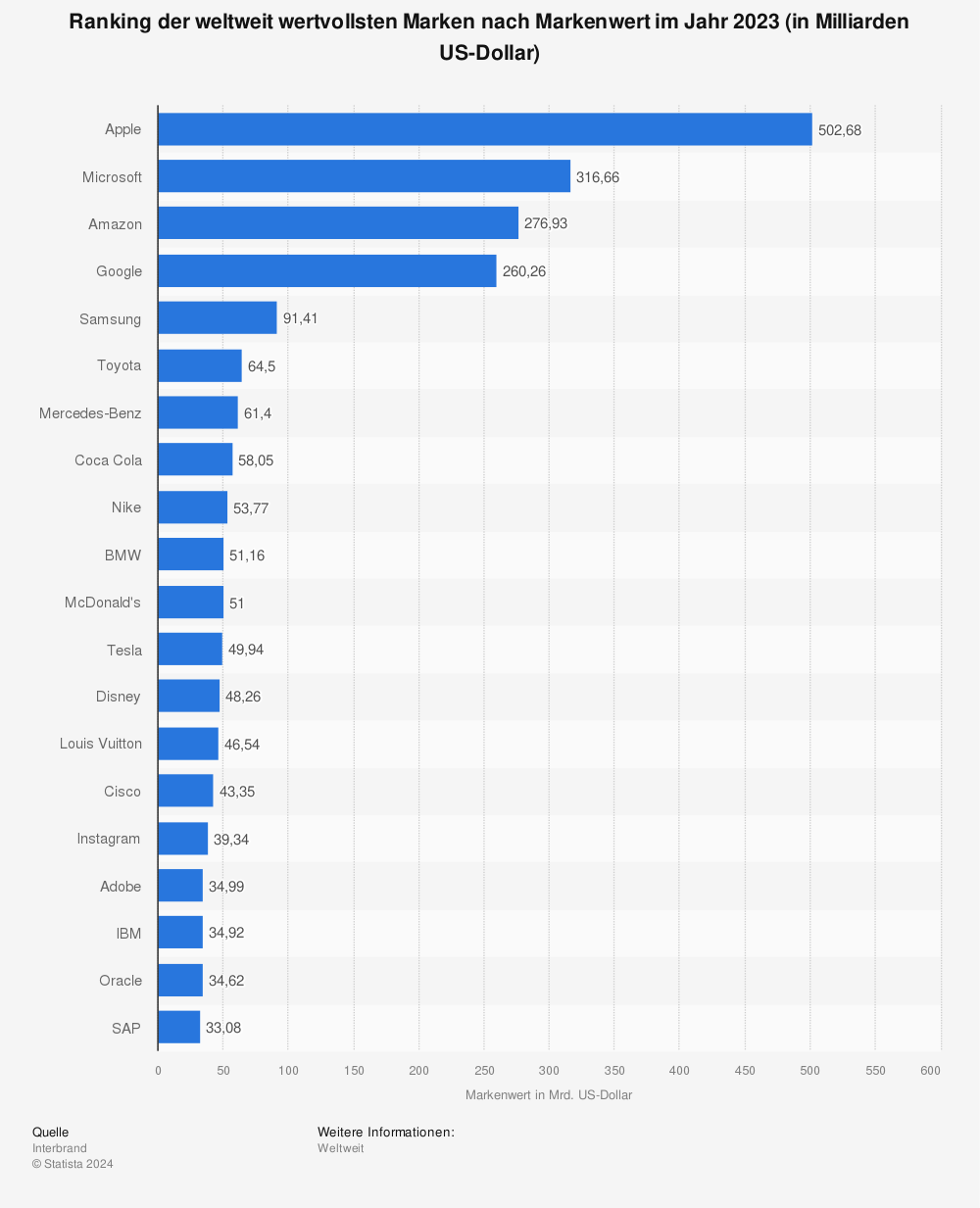
Here you can see the ranking of the world’s most valuable brands by brand value in 2021 (in billions of US dollars). With a market value of 36.25 billion US dollars, Facebook is in 15th place in the ranking after Apple, Amazon and Microsoft.
Social apps worldwide: A-Z
Facebook, Instagram, YouTube, messengers such as Whatsapp, Telegram or apps in Asia such as WeChat, Sina Weibo, Line, Snow, Youku, here you will find an overview of the most important apps from all over the world:


 4.9 / 5.0